
WhatsApp Business API pricing in India: what you actually pay
The short answer
WhatsApp Business pricing in India has two layers: Meta's per-message charge and your provider's platform fee. Meta's India rates effective 1 July 2026 are roughly Rs 0.8631 for a marketing message and Rs 0.1150 each for utility and authentication, plus 18% GST, before any provider markup. Marketing costs about seven to eight times what utility costs, so your message mix decides your bill far more than your volume does.
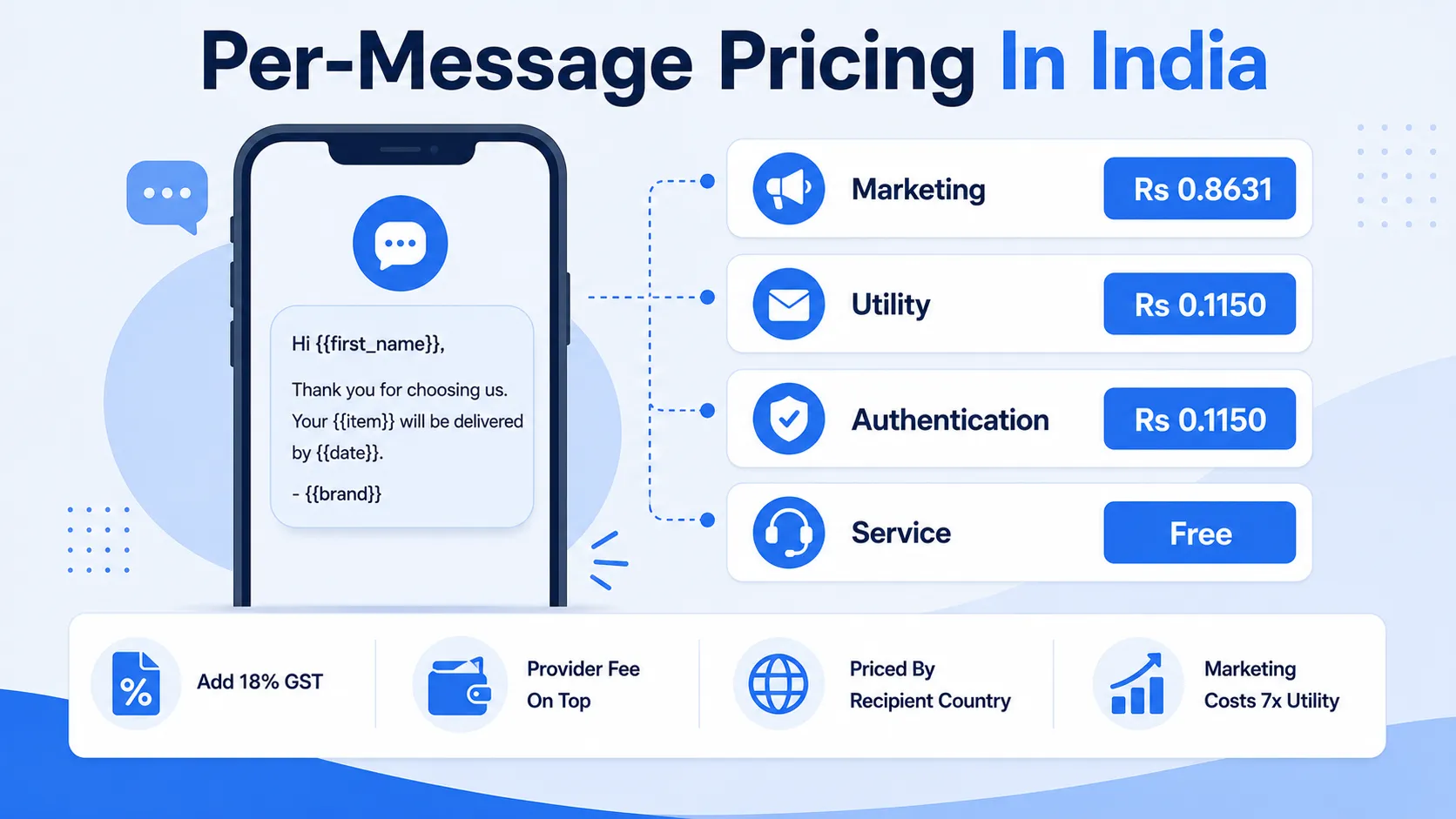
Rates change and providers quote differently. Verify against Meta's official rate card and your provider's contract before budgeting.
The pricing model changed: conversations became messages
The old model charged per 24-hour conversation window. That model is gone, and the replacement changes how you should think about cost.
You now pay for each template message delivered, priced by category and by the recipient's country code, not by your business location. That last detail matters more than it sounds: message a customer in Mumbai and you pay India's rate even if your company is registered in Singapore or London.
India is among the cheapest WhatsApp markets in the world, which is why adoption here has moved faster than almost anywhere else across fintech, e-commerce, logistics and BFSI. It also means any cost model built from US or UK rate cards will be wrong by an order of magnitude, usually in the direction that makes the channel look unaffordable when it is not.
The practical consequence of per-message pricing is that cost now scales with how many messages you choose to send rather than how many conversations happen to open. That sounds worse and is often better, because it puts the spending decision back in your hands. A business that sends fewer, better-targeted messages now pays less, where under the old model the bill was driven partly by inbound volume it did not control.
The four message categories
Meta's India rates effective 1 July 2026, before 18% GST and before any provider markup.
| Category | What it covers | India rate |
|---|---|---|
| Marketing | Promotions, offers, re-engagement, abandoned cart recovery | Rs 0.8631 |
| Utility | Order updates, payment receipts, delivery status, appointment reminders | Rs 0.1150 |
| Authentication | OTPs, account verification, password and account recovery | Rs 0.1150 |
| Service | Replies inside a conversation the customer started | Free |
What the rate card does not tell you
- Add 18% GST on top of every figure. A Rs 0.8631 marketing message costs roughly Rs 1.02 delivered.
- Meta raised the India marketing rate by about 10% on 1 January 2026, from Rs 0.7846 to Rs 0.8631. Utility and authentication rates stayed flat.
- Providers quote different numbers because some include their markup and some do not. Rates quoted as Rs 1.09 marketing or Rs 0.145 utility are usually Meta's rate with a provider margin folded in.
- Category is assigned by Meta at template approval, not by you. A message you consider utility can be classified as marketing and billed at seven to eight times the rate.
- Rates are set per recipient country. A single campaign to Indian and UK customers is billed at two very different rates in the same invoice.
The single most useful question to ask a provider is not what they charge. It is what Meta charges and what they add on top of it.
The free windows, and the one that is closing
Service messages stay free
When a customer starts the conversation, your replies inside that window carry no per-message charge. For a support-led business this is the cheapest channel available, and it rewards making it easy for customers to message you first.
Utility inside the 24-hour window
Utility messages sent inside the customer service window have been free. That changes on 1 October 2026. If your support or order-update flow leans on this, model your costs for after that date now rather than discovering it in an invoice.
Your message mix, not your volume
Because marketing costs roughly seven to eight times what utility costs, two businesses sending identical message counts can receive very different bills.
Take 50,000 messages a month. At 40,000 marketing and 10,000 utility, you are looking at roughly Rs 35,700 at Meta's rates before GST and markup. Flip the ratio to 10,000 marketing and 40,000 utility and the same 50,000 messages cost roughly Rs 13,200. Same volume, less than half the bill.
That gap is not a pricing trick. It reflects what the categories are for. Utility messages are things the customer asked for by transacting with you: an order confirmation, a delivery update, a receipt. Marketing messages are things you decided to send. Meta prices the second higher because the first is expected and the second is intrusive.
Two levers follow directly. First, send as utility or authentication anything that legitimately qualifies, and write the template so it reads that way. Second, stop broadcasting marketing to your entire list every week. Segmentation stops being a performance tactic at this point and becomes a straightforward cost control.
There is a third lever most businesses miss: encourage customers to start conversations. Every inbound conversation opens a free service window. A prominent WhatsApp link on your order confirmation page costs nothing and shifts volume from a paid category to a free one.
What your provider charges on top
Platform fee
Meta's per-message rate is identical whichever provider you use, so the only differentiator is their fee. Models vary between per-message markup, flat monthly plans and volume tiers. Run your own expected volume through each before signing.
Setup fee
Meta charges nothing to set up the API. Indian providers commonly charge between nothing and Rs 25,000 as a one-time fee, which is negotiable more often than they suggest.
Green tick
Official Business Account verification is free from Meta and applied for through your provider. There is no paid fast-track, whatever anyone tells you, and no provider can guarantee approval.
Getting set up, in order
The sequence matters, because two of these steps have waiting periods you cannot compress.
Prepare the prerequisites
A registered business, a phone number not currently attached to a personal WhatsApp account, and a Facebook Business Manager account. The phone number requirement catches people out: if the number is already on personal WhatsApp, it has to be removed first, which is not instant.
Choose a provider and set INR billing
Set the WhatsApp Business Account to bill in INR from the start. Existing USD-billed accounts cannot be converted later, so getting this wrong means creating a new account and repeating the onboarding.
Submit templates early
Template approval is where the timeline actually goes. Submit your core templates while other setup is still in progress, because a rejected template needs rewriting and resubmission.
Check the assigned category on every approval
Do not assume the category you requested is the category you received. Check each approved template and rewrite anything misclassified as marketing before you start sending at volume.
Apply for verification, then go live
The green tick is a separate application from API access. Start sending once templates are approved; verification can follow.
From our own integrations
We work with the official Meta WhatsApp Business API rather than any device-based workaround, and that distinction matters more than it sounds. Unofficial bulk-sending approaches get numbers banned, and the ban takes the business number with it — the same number printed on your invoices and listed on your website.
On the official API the real friction is template approval. Categories are assigned by Meta, not by you, and a message you consider utility may be classified as marketing, which is roughly seven to eight times the cost. Get your templates categorised correctly before you model your budget, not after the first invoice arrives.
On one client platform we distributed 3.5 million documents autonomously across WhatsApp, email and SMS. At that volume, category discipline stops being an optimisation and becomes the difference between a viable channel and an unaffordable one. It also changes what you build: delivery failure handling and retry logic matter far more at three million messages than they do at three thousand.
Before you sign with a provider
- Ask for the exact per-message markup over Meta's published rate
- Confirm whether the quoted rate includes GST or excludes it
- Ask what the setup fee is, and whether it is waivable
- Check whether template submission and resubmission are chargeable
- Confirm INR billing is available before the account is created
- Ask what happens to your templates and number if you switch provider
Frequently asked questions
Building on the WhatsApp Business API?
We work with the official Meta API — template design, category planning, delivery at volume and failure handling. No device workarounds, no ban risk.